Say your meal. Keep a little context.
When a meal is easier to describe than photograph, say what you ate. MellowBite turns your words into a meal estimate you can review and correct.
IN THE APP
From a few spoken words to a saved meal
- Open VoiceOpen Voice from the meal-recording actions. Allow microphone access when asked, and check the spoken language.
- Describe the mealDescribe the foods and the amount you remember. For example: “Half a bowl of rice with tomato and eggs.” Mention extras such as oil, sauce, or a drink when you know them.
- Finish the estimateChoose Finish & estimate. MellowBite finishes the transcript and uses the meal description to prepare an estimate.
- Check and confirmReview the recognized foods, meal time, and portions. Correct anything that does not match, then confirm the record.
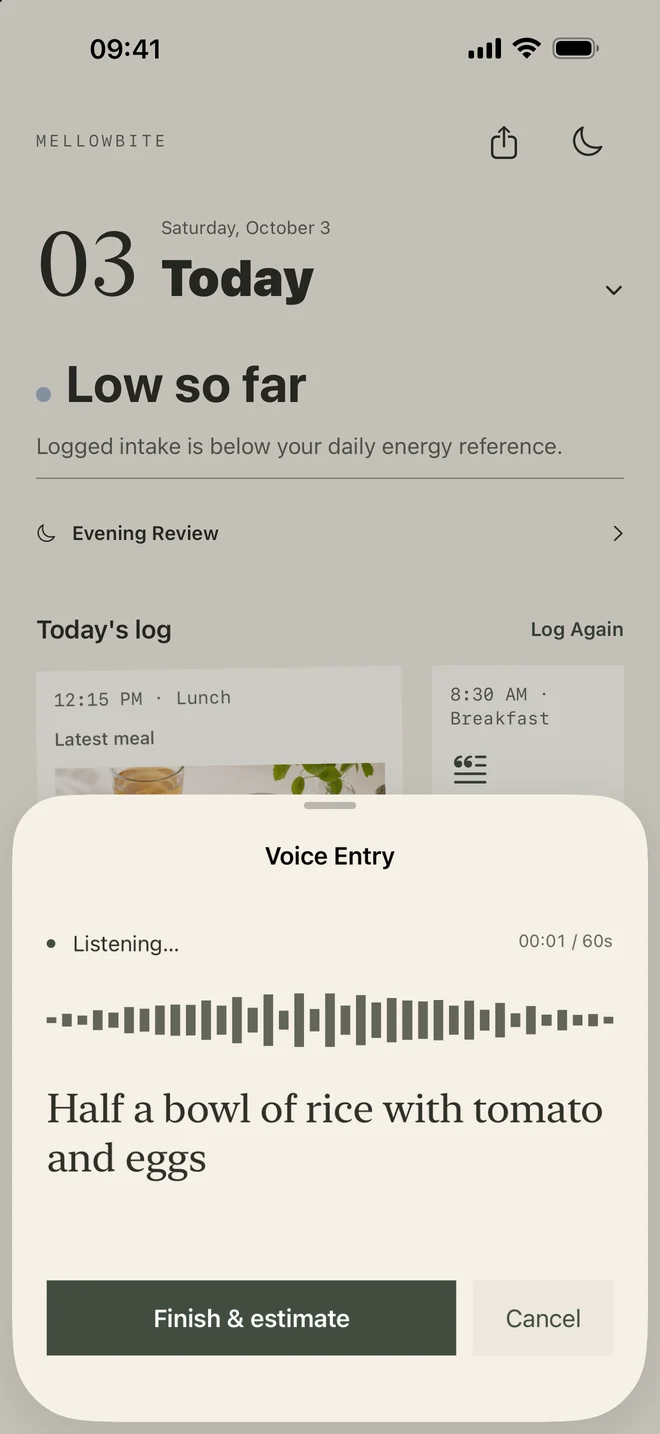
Describe what matters, in your own words
You do not need a nutrition script. The foods, an everyday portion description, and any remembered extras give the estimate more context. “A small bowl” can be more useful than a food name with no portion at all.
You can describe a meal after eating it. If you are recording an earlier day, select that date before opening the entry. Check the date and meal time before saving.
Speech recognition and meal estimation are different steps
The microphone captures your description. The app transcribes speech on the device when the system supports the selected language; initial language assets may need to download. The meal text then follows the same estimation process as a typed entry.
A recording lasts up to 60 seconds. At the limit, the app finishes transcription and starts estimation automatically. You still review the result before confirming the meal.
Voice recording does not make a meal estimate exact. If a food name was misunderstood, or an ingredient is missing, correct the description or the resulting foods. You can return to typing when recording is interrupted.
Review before the meal becomes part of your day
Finish & estimate starts estimation; it does not silently save an unreviewed meal. Check the result and choose the portion that best matches what you ate. On the confirmation screen, Less, Normal, and More are coarse adjustments, rather than measurements.
Voice estimates use the same AI allowance as text estimates. Quick Log remains another way to record a broad meal size without an AI estimate. The daily picture can remain Unclear when substantial meals are missing.
About the estimates
MellowBite supports everyday awareness. Foods, portions, and energy values are approximate. The app does not provide medical advice, nutrition therapy, diagnosis, or a weight-loss prescription.